List Formatting (It’s for Political Candidates, too!)

I’m having a ball listening to Grammar Girl’s podcast. Much of what she covers is already a part of my internal writer/editor/proofreader, but she has a nice, conversational approach that’s enjoyable regardless. Sometimes the episode I happen to listen to is particularly timely, as happened today with Formatting Vertical Lists. Useful tips I gleaned include

  • Don’t use a colon to introduce a list, unless the introduction is a complete sentence. (I think I’ve been violating this one for a while. But see how I reformed my ways in this post!)
  • Capitalize and punctuate list items if they are complete sentences.
  • Use bullets for unordered items, numbers to indicate sequence (steps), and letters to indicate choices or labels you can refer back to later.
  • Use parallel construction.

So, what was timely about this episode? Yesterday I had the pleasure of reading through candidate statements on my sample ballot. One in particular stood out for its egregious abuse of punctuation, overuse of capitalization, and general incoherence. Here is a verbatim excerpt that highlights multiple violations of Grammar Girl’s list formatting recommendations:

Donald Williamson Has The Experience and ECONOMIC RECOVERY PLAN to:
Stop Foreclosures! Help Families Save Their Home! (Recast Loan).
Cut State of California’s Dependency on Foreign Oil.
Wording on Reducing Gas Prices.
Balances California’s Budget: Cuts Fat-Waste, Stops Excessive Spending, No New Taxes!
Establish Health Care – Pharmacy Plan For All Californians.
Economic Recovery Plan: Creates Business, Jobs, Reduces Unemployment.

Oh, where to start? In terms of formatting, Donald has forgotten to use any sort of bullet at all for his list. He included the leading colon (I’m willing to forgive this one). He bolded and underlined each initial word, which only makes the lack of parallelism more grating. He would also have us believe that all of California’s families live in a single home. The vacuous content is even more alarming. I’m still utterly puzzled by #3 (“Wording!”). I’m not sure what “Fat-Waste” actually is, but it sounds pretty gross. Thank goodness Donald’s there for us with his blizzard of buzzword “solutions”, up to and including “No New Taxes!”

I read on, eager to learn how he was going to “recast” loans, do something to gas prices, provide a “health care – pharmacy” plan for all Californians, create “business” and jobs—all without introducing new taxes! Sadly, no details were forthcoming. Nor is any additional content available on his website, which features two bonus non-parallel lists, more families living in that single home, use of “that” instead of “who”, “receive” misspelled, etc.

The saddest part? Donald Williamson cites himself as an “Educator.” America’s future is in his hands, even if he loses his bid to represent the 59th District in the State Assembly. Please, Donald, next time devote just a few dollars to a good proofreading of your campaign materials. If nothing else, it sets a good example.
Productivity in Writing

I’ve tackled a few large writing projects over the past few years. Because I am a geek, I wrote a script that tallied the number of words I’d written every 15 minutes during each project. Because I am a scientist, I’ve analyzed the results and determined that, in each case, very different behavior is evident.

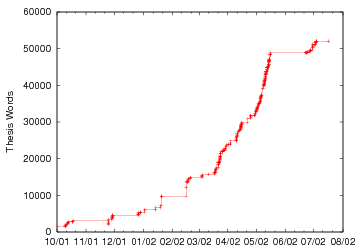
Among other things, writing my dissertation in 2001-2002 was an exercise in pure, undiluted focus. For several months, I did little but wake up, eat, write, sleep, repeat and repeat and repeat.


There are some gaps in November and December due to working on job applications and otherwise being distracted. The gap in February occurred when I fell victim to some horrible contagion that had me flat on my back for days, stole my voice, and forced me to reschedule a job interview. But from March to mid-May, it was smooth sailing. As my deadline approached, you can see the slope increasing until, near the end of May, I submitted the dissertation to my committee members for their review. I defended in June, made some revisions, and finally Phinished in July.

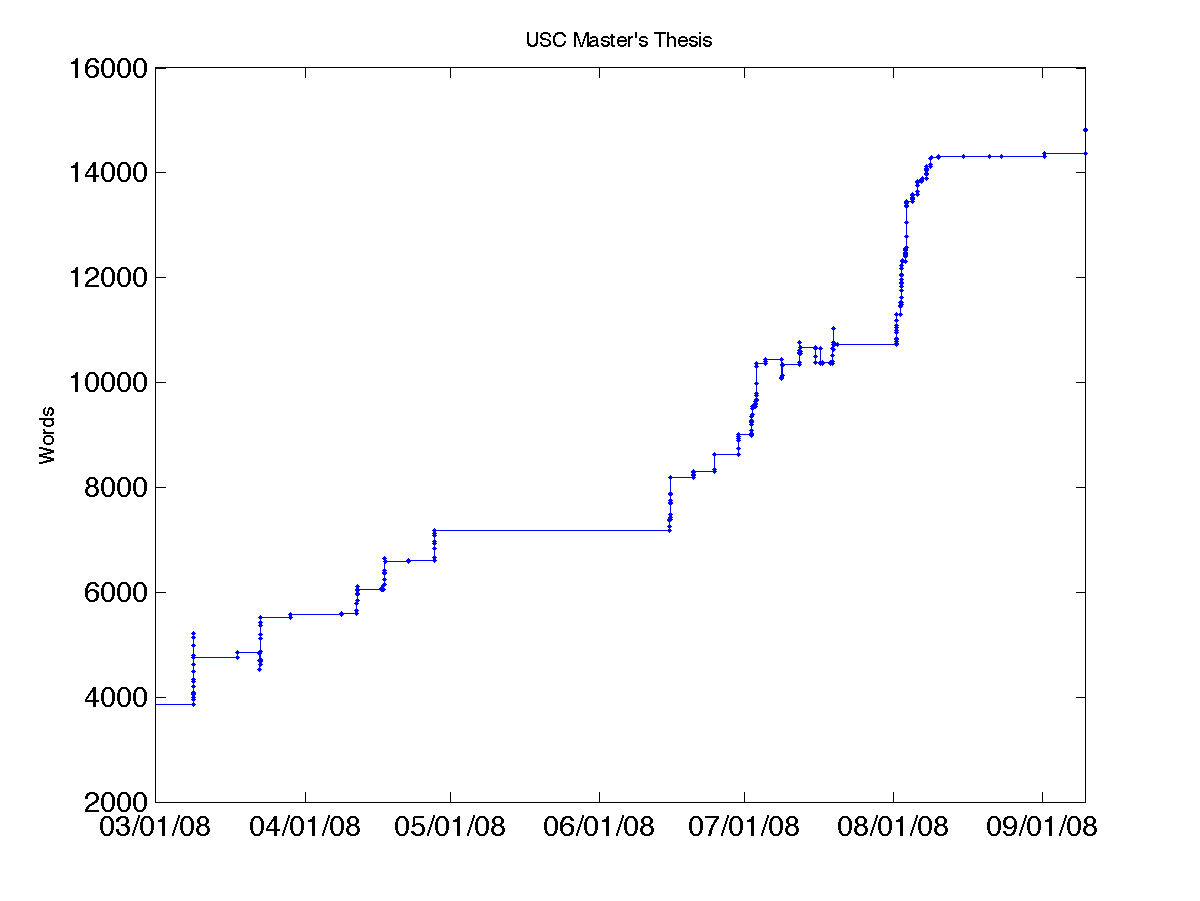
However, that smooth exponential behavior was not observed while working on my Master’s thesis in 2008:


Progress occurred in a very discontinuous way, because this time I was fitting writing time around my work schedule, mostly on weekends. I learned first-hand how hard it is to write a large document when each time you return to it, you have to invest significant effort in re-acquiring your train of thought. (The large gap in late May cannot, however, be blamed on work, and was instead due to a fabulous trip to Japan.) Writing also had to compete with coursework for my attention until early May. But it wasn’t only the time constraints that slowed me down. My job already involves a lot of technical writing, and I often found that at the end of the day the writing part of me felt drained dry, with little left over for more technical composition. Sure, the dissertation was much longer than the thesis… but sometimes it felt like writing the thesis took even more determination and willpower to bring it into being.

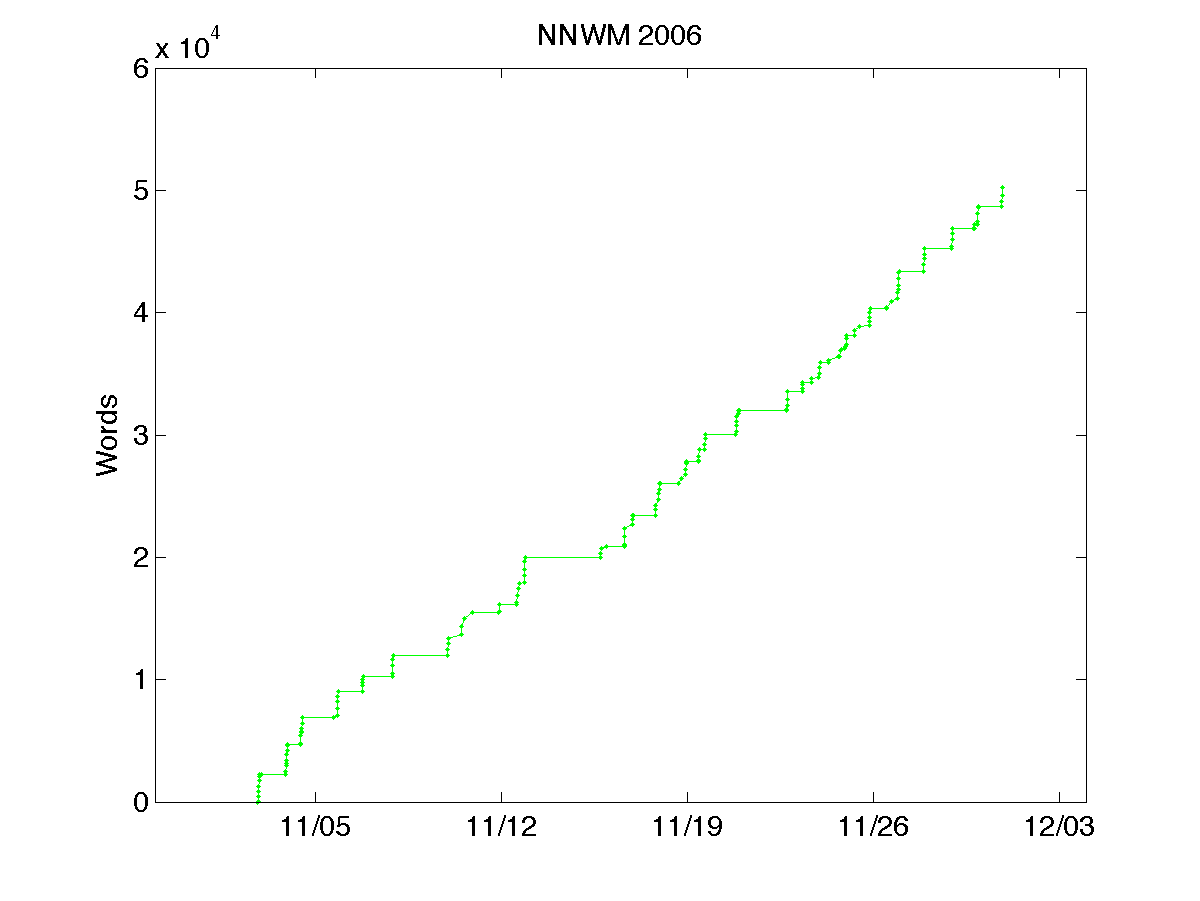
It’s interesting to contrast both of these to my productivity during November 2006, in which I tackled a work of fiction. National Novel Writing Month challenges you to write 50,000 words in 30 days. Now, my dissertation was just over 50,000 words, so I knew it was theoretically possible–except that I’d had much more than a month to write it. Of course, writing fiction is a whole different ballgame, unfettered by factual reporting and experimental results. Since the goal is to produce a certain number of words, rather than a coherent document about a research project, it’s much easier to break it down into equally sized daily word count targets, which we see reflected in the plot:


This one is much better fit by a linear trend than an exponential one, indicating almost no procrastination that would otherwise necessitate a final push. But “procrastination” is a deceptive term. Exponential productivity in writing a thesis or dissertation is not necessarily a result of procrastination; you can’t really split up the final goal into tiny daily chunks because it’s hard (or impossible) to define what the final product should look like until you’re already there. Outlines are helpful, but no one can predict how many words it will take to address each point you need to make. Overall, I learned that if the goal is raw, regular productivity, then I can meet it, at least for a month (even working around a full-time job and the hardest class I ever took at USC!). On the other hand, if I’m attempting thoughtful, substantial, technical composition, then I do best with solid uninterrupted chunks of time. This definitely isn’t a place where I can work wonders while multitasking!

How to Make LaTeX use a Hanging Indent

Ah, LaTeX. The programmer’s text processing system, in which you have to compile your document before it turns into something viewable. It gives us the joys of truly beautiful equation typesetting and the agonies of obscure commands, crazy “badness” rules, and sometimes obstreperous auto-figure placement.

Today was a case in point. I’m typesetting the index for a book and I wanted to get entries to have hanging indents, like this:

This is my paragraph, which I am writing to demonstrate what it looks like to have a paragraph that wraps and uses a hanging indent.

The only problem is that LaTeX only lets you specify how much to indent the first line of a paragraph, not the rest. The assumption is that the “typical” sort of indentation you want is to get paragraphs like this:

This is another paragraph, which shows what it looks like to have a paragraph that wraps but indents the first line instead of the following lines.

The solution turns out to be to set your left margin in to where you want the hanging lines to be, and then use a negative offset to specify the indentation of the first line. Here’s an example:

\leftskip 0.1in
\parindent -0.1in

Thank you, google! Talk about thinking outside the box.

P.S. What’s funny is that HTML has the same limitation, so to show the first example above, I had to set a negative text indentation.

This They Believe

I recently finished reading “This I Believe”, a compilation of 500-word essays on various people’s self-articulated core beliefs. Virtually every essay, whether you agree with the beliefs in it or not, makes for fascinating reading. Here are just a few of my favorite excerpts:

  • Isabel Allende:
    “What is the point of having experience, knowledge, or talent if I don’t give it away? Of having stories if I don’t tell them to others? Of having wealth if I don’t share it? I don’t intend to be cremated with any of it! It is in giving that I connect with others, with the world, and with the divine.”
  • Mary Cook:
    “One very wise man told me, ‘You are not doing nothing. Being fully open to your grief may be the hardest work you will ever do.’ “
  • Albert Einstein:
    “Alongside the development of individual abilities, the education of the individual aspires to revive an ideal that is geared toward the service of our fellow man, and that needs to take the place of the glorification of power and outer success.”
  • Martha Graham:
    “I believe that we learn by practice. […] Practice means to perform, over and over again in the face of all obstacles, some act of vision, of faith, of desire. Practice is a means of inviting the perfection desired.”
  • Brian Greene:
    “I believe the process of going from confusion to understanding is a precious, even emotional, experience that can be the foundation of self-confidence.”
  • Rick Moody:
    “I read Umberto Eco’s ‘Role of the Reader’, in which it is said that the reader completes the text, that the text is never finished until it meets this voracious and engaged reader. The open texts, Eco calls them.”
  • Mel Rusnov:
    “In ordinary life, I’m a civil engineer. […] But in my other life, I am a pianist… [After gaining applause from an impromptu performance in an airport lobby,] I thought: No one smiled and clapped after my presentation on the site engineering for a new strip mall.”
  • Wallace Stegner:
    “Everything potent, from human love to atomic energy, is dangerous; it produces ill about as readily as good; it becomes good only through the control, the discipline, the wisdom with which we use it.”
  • Deirdre Sullivan:
    “‘Always go to the funeral’ means that I have to do the right thing when I really, really don’t feel like it. I have to remind myself of it when I could make some small gesture, but I don’t really have to and I definitely don’t want to.”

I’m not quite ready to submit my own essay, but I’m very much looking forward to discussing these beliefs, and more, with my fellow salonniers.

How to embed fonts in a PDF file

This is an issue that comes up every now and then, for example when you create a PDF file that’s designed for actual printing (like in a book). The fonts used by PDF (or PS) files can be either embedded or simply “linked” to fonts already installed on the system. The advantage to linking is that the file size can be a lot smaller; the PDF file doesn’t need to carry around a full description of how to render each font. Unfortunately, the destination system doesn’t always have the fonts you want. The safest solution is to embed every font description in the PDF file.

But how do you make this magic happen? There are two important steps I learned about today. (These apply to linux/unix/Mac systems.)

1. Tell pdflatex, dvips, and dvipdf to embed the fonts.

The best instructions I’ve seen for this are here. Basically, you run `updmap` to find out where your config file is, then edit it to indicate that you want the fonts to be embedded. Re-run `updmap` to make those config settings stick, and then you can do pdflatex or dvips or dvipdf (as desired) to create files with embedded fonts.

That will get you most of the way there. However, if you’re including figures (say, .eps files) that also have their own fonts that weren’t embedded, and those font names aren’t recognized, you may get an error like:

dvips: Font Helvetica used in file fancy_widget.eps is not in the mapping file.

You can’t embed the font if your system doesn’t have a mapping for it. Oops! This usually happens with fonts like Helvetica, Times, and Symbol; these are proprietary font names, so their mappings aren’t found in most open source systems. But you can fix this problem, as described in this excellent font reference, by replacing the font names with their open-source equivalents:

2. Replace proprietary font names with their open-source equivalents.

Since .eps is a text format, you can just open the .eps file in a text editor and search/replace the font names. Markus Neteler makes this even easier with a handy bit of sed:

cat original_graphics.eps | sed 's+Times-Bold+NimbusSanL-Bold+g' |\
sed 's+Times-Roman+NimbusSanL-Regu+g' |\
sed 's+Times+NimbusSanL-Regu+g' |\
sed 's+Helvetica-BoldOblique+NimbusSanL-BoldItal+g' |\
sed 's+Helvetica-Oblique+NimbusSanL-ReguItal+g' |\
sed 's+Helvetica-Bold+NimbusSanL-Bold+g' |\
sed 's+Helvetica-Bold-iso+NimbusSanL-Bold+g' |\
sed 's+Helvetica+NimbusSanL-Regu+g' |\
sed 's+Helvetica-iso+NimbusSanL-Regu+g' |\
sed 's+Symbol+StandardSymL+g' > new_graphics.eps

For the particular file I was working on today, a couple of additional fonts didn’t show up on Markus’s list. They were all variants on the Courier font. After some hunting around, I figured out that Courier is “Nimbus Mono L”, so here’s the translation:

Courier NimbusMonL-Regu
Courier-Bold NimbusMonL-Bold
Courier-Oblique NimbusMonL-ReguObli
Courier-BoldOblique NimbusMonL-BoldObli

Finally, you may want to check the file to confirm that the fonts were embedded. It seems that you can use a utility called ‘pdffonts’ to do this from the command-line, but I don’t have it on my system. Alternatively, you can fire up Adobe Reader, go to “File->Document Properties”, click on the “Fonts” tab, and browse to see that each font is marked “embedded.”

« Newer entries · Older entries »